survivalful/discord-docker-bot repository overview
🐳 Discord Docker Monitor Bot



Monitor your Docker containers directly from Discord — automatic status updates every 30 seconds, crash alerts, uptime tracking, and full container control via slash commands.
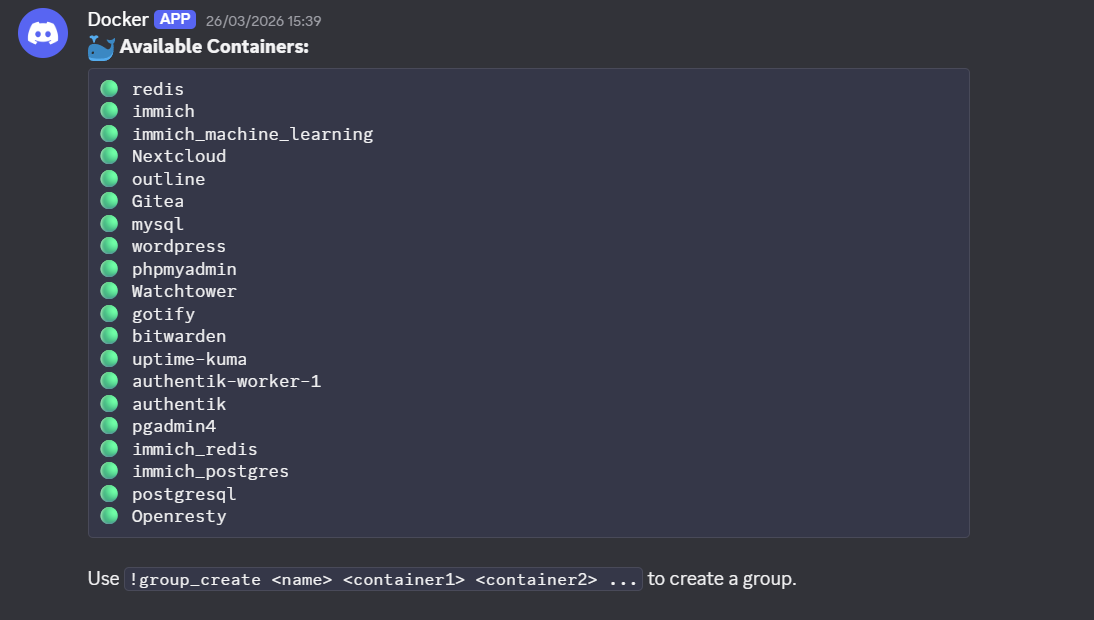
✨ Features
- 📋 List all Docker containers on your host
- 📁 Group containers with dedicated Discord channels
- 🔄 Automatic status updates every 30 seconds
- 🟢 Live status indicators (running, exited, paused, created)
- ⏱️ Uptime display for running containers
- 🚨 Crash alerts — configurable per group channel or a separate alert channel
- ▶️ Start / ⏹️ Stop containers directly from Discord
- 📋 View live logs of any container (last 20 lines)
- 🔒 Read-only channels for regular users
- 🏥 Health check endpoint on
:8080/health
🚀 Quick Start
Option A — Docker Run (fastest)
docker run -d \
  --restart unless-stopped \
  -e BOT_TOKEN=your_token \
  -e DOCKER_HOST=tcp://your-host:2375 \
  -e GUILD_ID=your_guild_id \
  -e CATEGORY_NAME="Docker Status" \
  -p 8080:8080 \
  survivalful/discord-docker-bot:latest
Option B — Docker Compose (recommended)
- Create your
.envfile:
BOT_TOKEN=your_discord_bot_token
DOCKER_HOST=tcp://your-docker-host:2375
GUILD_ID=your_discord_server_id
CATEGORY_NAME=Docker Status
- Create your
docker-compose.yml:
services:
  discord-bot:
    image: survivalful/discord-docker-bot:latest
    restart: unless-stopped
    env_file:
      - .env
    ports:
      - "8080:8080"
- Start it:
docker compose up -d
That's it! 🎉
After the bot starts, run /setup in Discord to configure your alert preferences.
🤖 Commands
All commands are slash commands (/).
| Command | Description |
|---|---|
/info | Shows all available commands |
/setup | Configure crash alert mode and alert channel |
/container_list | Lists all containers with status and uptime |
/container_start <name> | Starts a container |
/container_stop <name> | Stops a container |
/container_logs <name> | Shows the last 20 log lines of a container |
/group_create <name> <containers> | Creates a group with a dedicated channel |
/group_remove <name> | Deletes a group and its channel |
/group_list | Shows all existing groups |
Note: Container and group names support autocomplete.
🚨 Crash Alerts
Configure alert behaviour with /setup:
| Alert Mode | Behaviour |
|---|---|
In each group channel | Crash alerts are posted in the group channel the container belongs to |
In a separate alert channel | All crash alerts go to a single dedicated channel |
A crash is detected when a container transitions from running → exited during the 30-second monitoring cycle.
📊 Status Indicators
| Symbol | Status |
|---|---|
| 🟢 | Running |
| 🔴 | Exited |
| 🟡 | Paused |
| ⚪ | Created |
| ❓ | Unknown |
Running containers also display their uptime (e.g. 2d 4h 15m).
⚙️ Configuration
| Environment Variable | Required | Default | Description |
|---|---|---|---|
BOT_TOKEN | ✅ | — | Your Discord bot token |
DOCKER_HOST | ✅ | — | Docker remote API URL (e.g. tcp://host:2375) |
GUILD_ID | ✅ | — | Your Discord server ID |
CATEGORY_NAME | ❌ | Docker Status | Category name for group channels |
Alert settings (mode and channel) are saved persistently in settings.json via /setup.
🏥 Health Check
The bot exposes a health check endpoint at:
GET http://<host>:8080/health
Returns 200 OK when the bot is running. Useful for container orchestration or uptime monitoring tools like Uptime Kuma.
⚠️ Security Warning
Port 2375 is unencrypted and unauthenticated. Anyone with network access to that port can control your Docker daemon.
Recommendations:
- Use a firewall to restrict access to port 2375
- Only expose it on a trusted local network
- Consider using Docker socket proxy as a safer alternative
- Never expose port 2375 to the public internet
🛠️ Troubleshooting
Bot starts but no channels are created
→ Check that GUILD_ID is correct and the bot has Manage Channels permission.
"Cannot connect to Docker"
→ Make sure the Docker remote API is enabled and DOCKER_HOST points to the right address.
Slash commands don't appear
→ Make sure the bot has the applications.commands scope. Commands are synced to the guild on startup.
Status stops updating
→ Restart the container: docker compose restart
Bot is offline in Discord
→ Check your BOT_TOKEN and verify the bot is still in your server.
No crash alerts received
→ Run /setup to configure an alert mode — without setup, alerts may fall back to the first available group channel.
🤝 Contributing
Contributions are welcome! Open an issue or submit a pull request on the Git repository.
📄 License
Licensed under GNU GPL v3.0 — free to use, modify and distribute, but changes must stay open-source.
🛠️ Support
Tag summary
Content type
Image
Digest
sha256:19667962f…
Size
51.3 MB
Last updated
5 months ago
docker pull survivalful/discord-docker-bot