lfedge/ekuiper
500K+
lfedge/ekuiper repository overview
Dockerfile links
Quick reference
-
Where to get help:
Website
Github
Documents
-
Where to file issues:
-
Supported architectures
amd64,arm64v8,arm32v7,i386 -
Supported Docker versions:
What is eKuiper
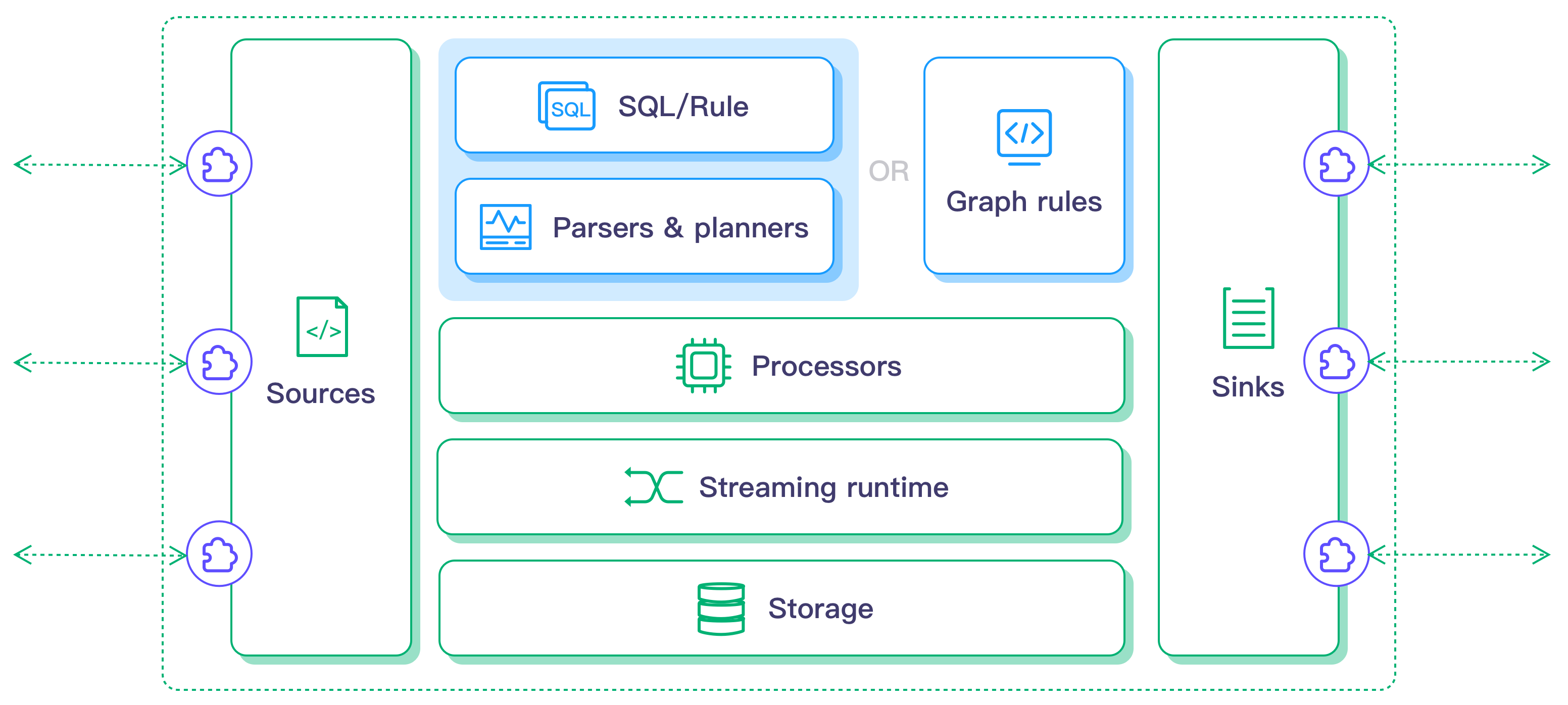
LF Edge eKuiper is a lightweight IoT data analytics and stream processing engine running on resource-constraint edge devices. The major goal for eKuiper is to provide a streaming software framework (similar to Apache Flink) in edge side. eKuiper's rule engine allows user to provide either SQL based or graph based (similar to Node-RED) rules to create IoT edge analytics applications within few minutes.
User scenarios
It can be run at various IoT edge user scenarios, such as,
- Real-time processing of production line data in the IIoT
- Gateway of connected vehicle analyze the data from CAN in IoV
- Real-time analysis of wind turbines and smart bulk energy storage data in smart energy
eKuiper processing at the edge can greatly reduce system response latency, save network bandwidth and storage costs and improve system security.
Features
-
Lightweight
- Core server package is only about 4.5M, memory footprint is about 10MB
-
Cross-platform
- CPU Arch:X86 AMD * 32/64; ARM * 32/64; PPC
- Popular Linux distributions, OpenWrt Linux, MacOS and Docker
- Industrial PC, Raspberry Pi, industrial gateway, home gateway, MEC edge cloud server
-
Data analysis support
- Support data ETL
- Data order, group, aggregation and join with different data sources (the data from databases and files)
- 60+ functions, includes mathematical, string, aggregate and hash etc
- 4 time windows & count window
-
Highly extensibile
It supports to extend at
Source,FunctionsandSinkwith Golang or Python.- Source: allows users to add more data source for analytics.
- Sink: allows users to send analysis result to different customized systems.
- UDF functions: allow users to add customized functions for data analysis (for example, AI/ML function invocation)
-
Management
- A free web based management dashboard for visualized management
- Plugins, streams and rules management through CLI, REST API and config maps(Kubernetes)
- Easily be integrate with Kubernetes framworks KubeEdge, OpenYurt, K3s Baetyl
-
Integration with EMQX products
Seamless integration with EMQX, Neuron & NanoMQ, and provided an end to end solution from IIoT, IoV
How to use this image
Run eKuiper
Execute some command under this docker image
docker run -d -v `pwd`:$somewhere lfedge/ekuiper:$tag $somecommand
For example
docker run -p 9081:9081 -d --name ekuiper MQTT_SOURCE__DEFAULT__SERVER="$MQTT_BROKER_ADDRESS" lfedge/ekuiper:$tag
Notice that, before v1.5.0 the mqtt server property is an array. Please check migration guide for detail.
5 minutes quick start
-
Set eKuiper source to an MQTT server. This sample uses server locating at
tcp://broker.emqx.io:1883.broker.emqx.iois a public MQTT test server hosted by EMQ.docker run -p 9081:9081 -d --name ekuiper -e MQTT_SOURCE__DEFAULT__SERVER="tcp://broker.emqx.io:1883" lfedge/ekuiper:$tag -
Create a stream - the stream is your stream data schema, similar to table definition in database. Let's say the temperature & humidity data are sent to
broker.emqx.io, and those data will be processed in your LOCAL RUN eKuiper docker instance. Below steps will create a stream nameddemo, and data are sent todevices/device_001/messagestopic, whiledevice_001could be other devices, such asdevice_002, all of those data will be subscribed and handled bydemostream.-- In host # docker exec -it ekuiper /bin/sh -- In docker instance # bin/kuiper create stream demo '(temperature float, humidity bigint) WITH (FORMAT="JSON", DATASOURCE="devices/+/messages")' Connecting to 127.0.0.1:20498... Stream demo is created. # bin/kuiper query Connecting to 127.0.0.1:20498... kuiper > select * from demo where temperature > 30; Query was submit successfully. -
Publish sensor data to topic
devices/device_001/messagesof servertcp://broker.emqx.io:1883with any MQTT client such as MQTT X.# mqttx pub -h broker.emqx.io -m '{"temperature": 40, "humidity" : 20}' -t devices/device_001/messages -
If everything goes well, you can see the message is print on docker
bin/kuiper querywindow. Please try to publish another message withtemperatureless than 30, and it will be filtered by WHERE condition of the SQL.kuiper > select * from demo WHERE temperature > 30; [{"temperature": 40, "humidity" : 20}]If having any problems, please take a look at
log/stream.log. -
To stop the test, just press
ctrl + cinbin/kuiper querycommand console.
You can also refer to eKuiper dashboard documentation for better using experience.
Next for exploring more powerful features of eKuiper? Refer to below for how to apply LF Edge eKuiper in edge and integrate with AWS / Azure IoT cloud.
- Lightweight edge computing eKuiper and Azure IoT Hub integration solution
- Lightweight edge computing eKuiper and AWS IoT Hub integration solution
Image Variants
The lfedge/ekuiper images come in many flavors, each designed for a specific use case.
lfedge/ekuiper:<tag>
This is the defacto image. If you are unsure about what your needs are, you probably want to use this one. It is an alias of tag lfedge/ekuiper:<tag>-alpine(see below) since 1.7.1. Previously, it is equivalent to the lfedge/ekuiper:<tag>-dev image
lfedge/ekuiper:<tag>-alpine
This image is based on the popular Alpine Linux project, available in the alpine official image. Alpine Linux is much smaller than most distribution base images (~5MB), and thus leads to much slimmer images in general.
This variant is highly recommended when final image size being as small as possible is desired. The main caveat to note is that it does use musl libc instead of glibc and friends, so certain software might run into issues depending on the depth of their libc requirements. However, most software doesn't have an issue with this, so this variant is usually a very safe choice. See this Hacker News comment thread for more discussion of the issues that might arise and some pro/con comparisons of using Alpine-based images.
To minimize image size, it's uncommon for additional related tools (such as git or bash) to be included in Alpine-based images. Using this image as a base, add the things you need in your own Dockerfile (see the alpine image description for examples of how to install packages if you are unfamiliar).
lfedge/ekuiper:<tag>-slim
This image is based on Debian, and only contains the minimal packages needed to run eKuiper. The difference between this and dev image (lfedge/ekuiper:<tag>-dev) is that this image does not include Golang development environment. The typical usage of this image would be deploy the plugins compiled in previous Docker image instances. This is the official recommended image if you want to deploy & run customized plugins into eKuiper.
lfedge/ekuiper:<tag>-slim-python
This image is the same as slim except that it also contains python environment. It is recommended if using eKuiper python portable plugins.
lfedge/ekuiper:<tag>-dev
This is the development Docker image, which is based on Debian and it also includes a Golang build environment. If you are unsure about what your needs are, you probably want to use this one. It is designed to be used both as a throw away container (mount your source code, compile plugins for eKuiper, and start the container to run your app), as well as the base to build other images. Please be aware of that this image is the biggest size, and it's usually used for development purpose.
Notice: This image is the equivalent to development image of x.x.x-dev in 0.3.x versions.
Configuration
eKuiper supports to use environment variables to modify configuration files in containers.
When modifying configuration files through environment variables, the environment variables need to be set according to the prescribed format, for example:
KUIPER__BASIC__DEBUG => basic.debug in etc/kuiper.yaml
MQTT_SOURCE__DEMO_CONF__QOS => demo_conf.qos in etc/mqtt_source.yaml
The environment variables are separated by two "_", the content of the first part after the separation matches the file name of the configuration file, and the remaining content matches the different levels of the configuration item.
Migration Guide
Since 1.5.0, eKuiper changes the mqtt source broker configuration from servers to server and users can only configure a mqtt broker address instead of address array.
Users who are using mqtt broker as stream source in previous release and want to migrate to 1.5.0 release or later, need make sure the etc/mqtt_source.yaml file server 's configuration is right.
Users who are using environment variable to configure the mqtt source address need change their ENV successfully, for example, their broker address is tcp://broker.emqx.io:1883. They need change the ENV from
MQTT_SOURCE__DEFAULT__SERVERS=[tcp://broker.emqx.io:1883] to MQTT_SOURCE__DEFAULT__SERVER="tcp://broker.emqx.io:1883"
About EdgeX
Regarding the configuration content of etc/sources/edgex.yaml, these values are configured in the cmd cmd/core-data/res/configuration.toml of the EdgeX core data service, as shown below.
[MessageQueue]
Protocol = 'tcp'
Host = '*'
Port = 5563
Type = 'zero'
Topic = 'events'
[Service]
...
Host = 'localhost'
Port = 48080
...
If you want to configure more options, you can mount the configuration file into eKuiper container, like this:
$ docker run --name ekuiper -v /path/to/mqtt_sources.yaml:/kuiper/etc/mqtt_sources.yaml -v /path/to/edgex.yaml:/kuiper/etc/sources/edgex.yaml lfedge/ekuiper:$tag
More
If you'd like to know more about the project, please refer to Github project.
Tag summary
Content type
Image
Digest
sha256:db0bc2763…
Size
42 MB
Last updated
3 months ago
docker pull lfedge/ekuiperThis week's pulls
Pulls:
4,660
Last week