jokobsk/netalertx
Centralized network visibility and asset discovery. Monitor devices, detect change, get notified.
1M+
jokobsk/netalertx repository overview





NetAlertX - Network Visibility & Asset Intelligence Framework
|| Docker guide || Releases || Docs || Plugins || Website
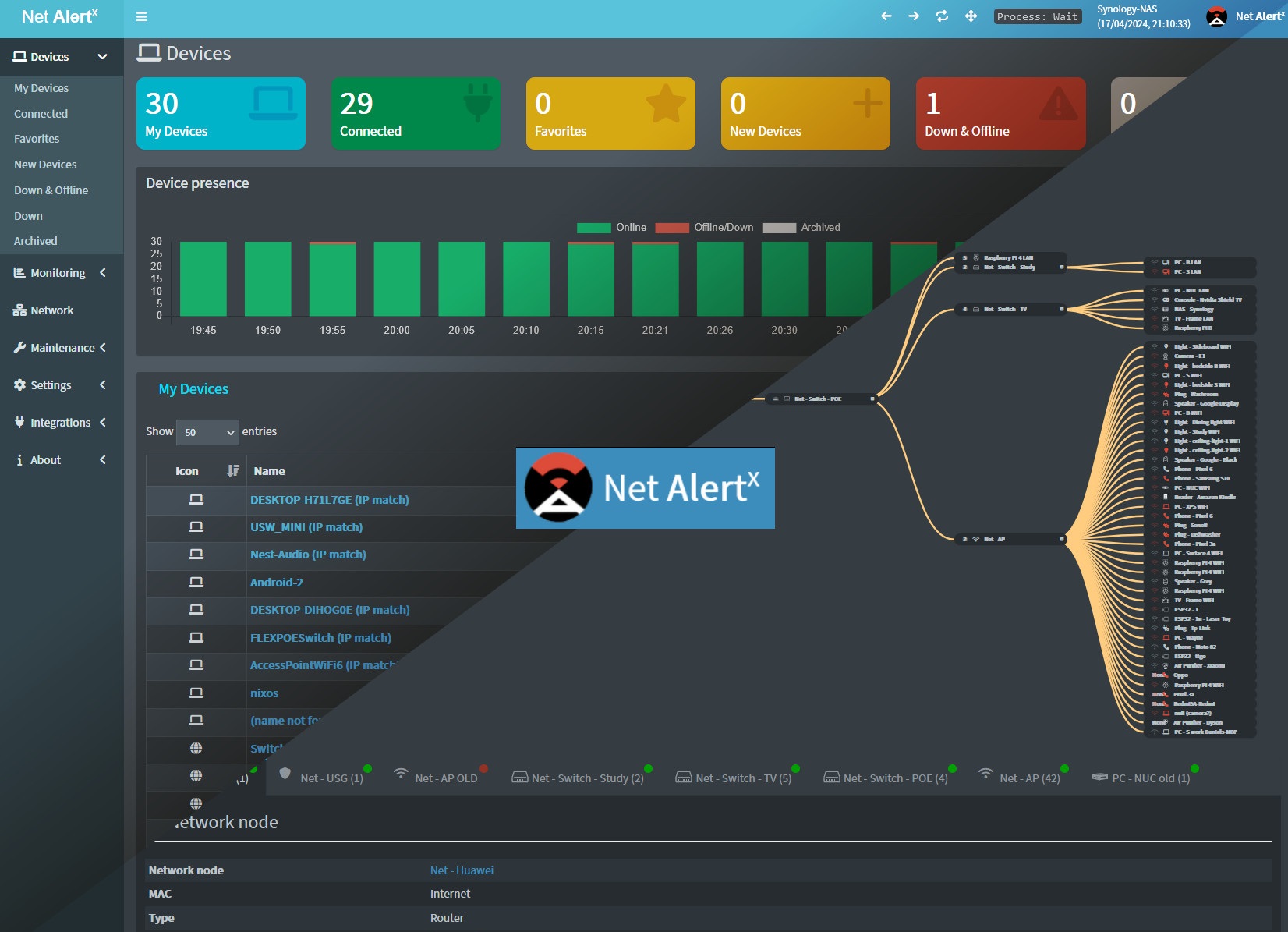
Head to https://netalertx.com/ for more gifs and screenshots 📷.
Note
There is also an experimental 🧪 [bare-metal install](https://docs.netalertx.com/HW_INSTALL) method available.
📕 Basic Usage
Warning
You will have to run the container on the `host` network and specify `SCAN_SUBNETS` unless you use other [plugin scanners](https://docs.netalertx.com/PLUGINS). The initial scan can take a few minutes, so please wait 5-10 minutes for the initial discovery to finish.
docker run -d --rm --network=host \
  -v /local_data_dir:/data \
  -v /etc/localtime:/etc/localtime \
  --tmpfs /tmp:uid=${NETALERTX_UID:-20211},gid=${NETALERTX_GID:-20211},mode=1700 \
  -e PORT=20211 \
  -e APP_CONF_OVERRIDE={"GRAPHQL_PORT":"20214"} \
  ghcr.io/netalertx/netalertx:latest
Runtime UID/GID: The image defaults to a service user
netalertx(UID/GID 20211). A separate readonly lock owner also uses UID/GID 20211 for 004/005 immutability. You can override the runtime UID/GID at build (ARG) or run (--user/ composeuser:) but must align writable mounts (/data,/tmp*) and tmpfsuid/gidto that choice.
See alternative docked-compose examples.
Default ports
| Default | Description | How to override |
|---|---|---|
20211 | Port of the web interface | -e PORT=20222 |
20212 | Port of the backend API server | -e APP_CONF_OVERRIDE={"GRAPHQL_PORT":"20214"} or via the GRAPHQL_PORT Setting |
Docker environment variables
| Variable | Description | Example/Default Value |
|---|---|---|
PUID | Runtime UID override, set to 0 to run as root. | 20211 |
PGID | Runtime GID override | 20211 |
PORT | Port of the web interface | 20211 |
LISTEN_ADDR | Set the specific IP Address for the listener address for the nginx webserver (web interface). This could be useful when using multiple subnets to hide the web interface from all untrusted networks. | 0.0.0.0 |
LOADED_PLUGINS | Default plugins to load. Plugins cannot be loaded with APP_CONF_OVERRIDE, you need to use this variable instead and then specify the plugins settings with APP_CONF_OVERRIDE. | ["PIHOLE","ASUSWRT"] |
APP_CONF_OVERRIDE | JSON override for settings (except LOADED_PLUGINS). | {"SCAN_SUBNETS":"['192.168.1.0/24 --interface=eth1']","GRAPHQL_PORT":"20212"} |
ALWAYS_FRESH_INSTALL | ⚠ If true will delete the content of the /db & /config folders. For testing purposes. Can be coupled with watchtower to have an always freshly installed netalertx/netalertx-dev image. | true |
You can override the default GraphQL port setting
GRAPHQL_PORT(set to20212) by using theAPP_CONF_OVERRIDEenv variable.LOADED_PLUGINSand settings inAPP_CONF_OVERRIDEcan be specified via the UI as well.
Docker paths
Note
See also [Backup strategies](https://docs.netalertx.com/BACKUPS).
| Required | Path | Description |
|---|---|---|
| ✅ | :/data | Folder which needs to contain a /db and /config sub-folders. |
| ✅ | /etc/localtime:/etc/localtime:ro | Ensuring the timezone is the same as on the server. |
:/tmp/log | Logs folder useful for debugging if you have issues setting up the container | |
:/tmp/api | The API endpoint containing static (but regularly updated) json and other files. Path configurable via NETALERTX_API environment variable. | |
:/app/front/plugins/<plugin>/ignore_plugin | Map a file ignore_plugin to ignore a plugin. Plugins can be soft-disabled via settings. More in the Plugin docs. | |
:/etc/resolv.conf | Use a custom resolv.conf file for better name resolution. |
Folder structure
Use separate db and config directories, do not nest them:
data
├── config
└── db
Permissions
If you are facing permissions issues run the following commands on your server. This will change the owner and assure sufficient access to the database and config files that are stored in the /local_data_dir/db and /local_data_dir/config folders (replace local_data_dir with the location where your /db and /config folders are located).
# Use the runtime UID/GID you intend to run with (default 20211:20211)
sudo chown -R ${NETALERTX_UID:-20211}:${NETALERTX_GID:-20211} /local_data_dir
sudo chmod -R a+rwx /local_data_dir
Initial setup
- If unavailable, the app generates a default
app.confandapp.dbfile on the first run. - The preferred way is to manage the configuration via the Settings section in the UI, if UI is inaccessible you can modify app.conf in the
/data/config/folder directly
Setting up scanners
You have to specify which network(s) should be scanned. This is done by entering subnets that are accessible from the host. If you use the default ARPSCAN plugin, you have to specify at least one valid subnet and interface in the SCAN_SUBNETS setting. See the documentation on How to set up multiple SUBNETS, VLANs and what are limitations for troubleshooting and more advanced scenarios.
If you are running PiHole you can synchronize devices directly. Check the PiHole configuration guide for details.
Note
You can bulk-import devices via the [CSV import method](https://docs.netalertx.com/DEVICES_BULK_EDITING).
Community guides
You can read or watch several community configuration guides in Chinese, Korean, German, or French.
Please note these might be outdated. Rely on official documentation first.
Common issues
- Before creating a new issue, please check if a similar issue was already resolved.
- Check also common issues and debugging tips.
💙 Support me
 |  |
|---|
- Bitcoin:
1N8tupjeCK12qRVU2XrV17WvKK7LCawyZM - Ethereum:
0x6e2749Cb42F4411bc98501406BdcD82244e3f9C7
📧 Email me at [[email protected]](mailto:[email protected]?subject=NetAlertX Donations) if you want to get in touch or if I should add other sponsorship platforms.
Tag summary
Content type
Image
Digest
sha256:e8d800176…
Size
104.1 MB
Last updated
8 days ago
docker pull jokobsk/netalertx